

HOW TO CREATE A WEBSITE FROM WORDPRESS?
First follow these steps:
Here’s what we’ll be covering today.
Step 1: choose prefect domain
Step 2: head to host for web hosting and domain registration for hosting you can contact
Step 3: INSTALL WORDPRESS
Step 4: Design your website with customizable theme
Step 5: build you websites architecture
Step 6: connect your web pages with menus
Step no1: choose prefect domain:
Choosing a domain is maybe the most important decision you can make for your site. So, choose unique and advance domain. Unfortunately, some good names are taken. You have to select new and unique name.
Go with .com, .org, or .NET. While there are plenty of domain name systems out there, it’s best to stick with the tried-and-true ones. You want people to be able to remember it, after all.

Use your name. A particularly great choice for a personal blog, website, or portfolio.
Avoid numbers and hyphens. This just makes it look weird in the URL. Plus, it makes it harder for people to say what your URL is to others.
Click here, If you want domain, you can contact me.
Step2: web hosting and domain registration:
A website needs just two things to “live”: A domain name and a web host
FOR WEB HOSTING AND DOMAIN REGISTRATION FROM WORDPRESS.COM
When you get your domain and web which not lunched at yet, then you have to install WordPress for customize your website
Step3: INSTALL WORDPRESS:
It’s easy to use, customizable, and free.
- Step 1: Head over to your main WORDPRESS dashboard once you purchase it.
- Step 2: Click on the My Sites tab in the left navigation menu, then click Create Site
- Click on My Sites tab again on the left navigation menu. Then find the domain you just created and click Log into WordPress.
STEP4: Design your website with customizable theme
With WordPress, your website can look and feel exactly how you want it to with themes.
These are pre-made designs that you can customize any way you want. WordPress has thousands of them available for you to choose from.
A lot of them are free. There are also some you need to pay for.
OPEN WORDPRESS DASHBOARD WHICH IS PRESENT AT YOUR LEFT
Once you’re in the admin dashboard, go to your sidebar and click Appearance>Themes>Add New Theme.
You can now customize the theme to your liking by clicking on the Customize button.
Each theme offers different options, but there’s a lot of overlap between themes. We’re going to go into more detail about what each option does—and whether or not it’s vital:
- Site Identity. Important. This area will allow you to change your site’s title as well as a sub-head or tagline. In most instances, you’ll also be able to upload a site icon as well. This is the image that appears in new browser tabs when people are on your website.
- Colors. Optional. Change your website’s color palette. For OceanPC, this section only allows you to change the color of the title text.
- Menus. Very important. It allows you to create a navigation menu for your website. Your reader will use this menu to discover and navigate to specific pages of your website. You’ll also be able to choose where the menu appears (e.g., top, footer, sidebar).
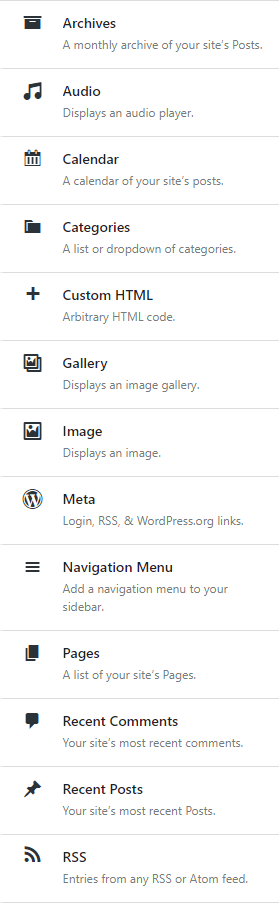
- Widgets. Optional. These are different tools you can place throughout your website such as archives, calendars, search bars, and more. Completely optional, but can be helpful depending on what website you have.
- Homepage Settings. Optional. This controls whether or not you have a static homepage, or if your website automatically shows your latest blog posts. Again, this is completely optional and dependent on your website’s needs.
- Additional CSS. Optional. This is where you can add further customization options using CSS code. This can be incredibly powerful if you have the right resources and knowledge to change your website.
- General Options. Important. This section allows you to customize a ton of different aspects about your website. It includes things like the size of your header, the icons you can use, the titles of your pages, the layouts, and more.
- Typography. Important. This is where you can customize all things font related. That includes the size of the font, what type of font you want to use, and where those fonts will appear. For example, you might want to go with Helvetica for your H2 headers, but you might want to go with Comic Sans for your title (please, don’t actually do this; it is just an example).
- Top Bar. Optional. This edits the top area of your website. You can add social links here, buttons to other pages, and more.
- Header. Important. Allows you to fully customize the header area of your website. Add images or logos, change the font and colors, or whatever else you want to do to make the website yours.
- Blog. Optional. This allows you to change the layout of your blog as well as which posts appear on your website’s main page.
- Sidebar. Optional. You can add a sidebar to your website. This is completely optional since your readers can just use the top navigation bar to get around your site.
- Footer widgets. Optional. Add tools and customize your footer.
- Footer Bottom. Optional. This is that part of the website with the copyright and contact information. It’s potentially important — especially if you’re running a business.
Spend some time now customizing your website to your heart’s desire. Once you’re finished, click Publish. Your website will update automatically to reflect your changes.
Step 5 build your website architecture:
- Homepage. This is the main page for your website. It’s what readers see first, so it’s very important.
- Contact page. This page shows how your users can contact you. This can be vitally important, depending on your business.
- About page. This page tells new visitors all about your website and/or business. Typically, businesses will put their “brand story” here about how they came to be.
- Online store. This is where your readers can purchase products and services from you. Again, can be vitally important depending on your business.
- Blog page. This page is where all of your blog posts go. If you plan on publishing articles for readers to read, this will be a very important part of your website taxonomy.
Creating pages on WordPress just takes a few clicks. Let’s jump into how you can create the most important page now for your website. For web designing contact

Step6 connect your web page with menu:
Then connect your web page with menu
From your WordPress dashboard, click on Appearance>Customize.
Then click on Menu>Create New Menu.
Okay, we admit: It’s a little underwhelming right now—but that’s because you haven’t gone about branding it or adding any real content yet!
We showed you how to get your website up and running. Now it’s YOUR turn to make it with content.
If you face any trouble during web creation you can contact me:GLAMLY BLOGS – Health and beauty articles. Your ARTICLES are here. (business.blog)
Web Designing Is Your Website Doing Business:
Web designing is an important factor for people doing business online. Online business is happening everywhere and almost everybody is doing it these days. However simply having a beautiful website will not deliver you what you are looking for. Web designing is the amalgamation of different components. A recent study conducted by a leading research agency shows that these days more and more people come to internet for business purpose. To deliver results to customers you must have a website that caters to all their requirements.
Designing a website is a complex process involving many elements. However, if a professional undertakes this work, it becomes very simple for you. There are many professionals who will do the work for you for a certain amount of fee. It is advisable to leave the designing part to a professional. Before embarking on designing the website make sure that you know what exactly you are looking for. This will help you in giving a clear picture of your requirements to the pro.
Hiring a pro to do your work is a fantastic way of going about designing a website. Decide on a theme. It may be anything a color, a photograph, a logo or an image. Make use of it throughout the website. Keep a constant tab on the progress of the work done on your website. Your website must be very appealing and visually pleasing for the visitors. Take note that your site contains images and visuals which moves, flashes and talks to visitors online. This is a sure shot way of grabbing attention. Ensure that the contents in your site are regularly updated.
Have plenty of templates in your website. Templates are cheap and look very good in a website. A photograph speaks a thousand words. Add proper photographs in the right places. Photo editor can be used to make the required alterations in the photographs. You must take note that the photographs used in the site complements with the goods in which your company is dealing. Make use of proper color coordination to make your site visually appealing.
Include a site map in your website. Using site map is the surest way of keeping a website organized. Your website must be easily accessible to the visitors. With so much of competition in this field no one will go for a time-consuming search to get what they are looking for. Make sure everything is properly displayed in the proper places. Another important factor which you must take note of is the target audience of your site. This is vital in determining the look of your site.
It is important look after your site properly. Check regularly to see if the information in your site is regularly updated or not. Test out to see if the links in your site are properly working or not. There is nothing more annoying than broken links to a visitor of a website.
4 Steps to Success in Web Development:
If you are planning to become a serious player in the WEBDesign world, you should know what to learn and discover. Here’s a short list that gives you an overview of your needs.
1. Learn HTML
Before you start creating websites you should master HTML. This is the key element to even start publishing documents on the web. This sounds pretty obvious but there are some elements that you should understand like the label element which will add great usability to a form.
2. Master Cascading Style Sheets (CSS)
I can’t stress this enough. DO NOT USE TABLES FOR YOUR LAYOUT!
Is it clear? Don’t, just don’t. Why? Because they work against you instead of for you. You can have so much more control of your layout, design and colors if you use 100% CSS.
1. CSS is easy
2. CSS is fast to create
3. CSS is lightning fast when your website loads
4. CSS is easy to modify
So, forget table layouts and start using stylesheets. You will really like the things you can accomplish once you master them.
3. Learn A Server-Side Language
This is needed to make dynamic websites like forums. PHP and ASP are a great example. You will need to understand what you can do with these languages and start using them.
Without a server-side language your websites are really hard to maintain and will give you a hard job in creating an efficient website structure.
4. Learn A Database Language
I recommend learning MySQL since this is an open-source database and is installed on most hosting providers in combination with PHP.
A database is nothing else then some tables with data. You can select data with queries like:
SELECT * FROM table WHERE ID = 3;
Now everything is selected from table when the ID equals three. It’s not hard to understand SQL, you just need to know how it works. PhpMyAdmin can help you a lot when you are creating your database.
So, start with step 1, and stick with CSS as long as you don’t master it. CSS is huge, and you will love it once you know how it works.
For application development you can’t do without a language like PHP and a database like MySQL.
Good Web Design:
In today’s highly technical world, everything is online. There is nothing you cannot buy, sell, trade, research, find pictures of, or play if you have a computer and Internet connection. These days, there is a web site out there for anything you could name.
Which means that someone probably has a web site a lot like yours? As competition for page views grows more intense, web design more technical, and the Internet more popular, good web design becomes more important than ever before. If you have a web site, then you want visitors to view that site. Good web design is the only way to make that happen.
The average Internet cruiser is more jaded these days, harder to impress. Good web design is the only way to get repeat visitors. There are several basic key elements to good web design that every web designer must know how to use.
Content. Internet search engines have grown very clever about searching content on web sites these days. Good web design is centered on your web site’s content. What keywords will people search to find your site? Once you know what your keywords are, you have to have plenty of content on your site that features those keywords. There are several free web sites that allow you to check your keyword content. Use them. Content is what search engines look at first, so it is here that you must make your impression.
Links. Search engines, and your visitors, love links. You want links that connect to other pages of your site, internal links, as well as external links that connect to pages outside your domain. The more links you have, the better, so use them liberally throughout your site. Links also improve the navigation of your site, which is incredibly important to good web design.
Graphics. Bright colors, pictures, and fun fonts will make or break your web site. Graphics are going to fly at Internet cruisers every way they look, so you want to make an impression with the graphics on your site. Good web design is about a pleasing flow of colors, pictures, graphics, and text. Don’t over clutter your pages, but make them exciting and interesting to look at.
Good web design is about learning how to balance key elements that appeal to search engines and your viewers. Your pages should flow together, your navigation should be easy, and your site filled with content. The only way to increase traffic to your site is through good web design that is updated regularly. This will ensure repeat, and new, business to your site. The more visitors you have, the better. Good web design is the only way to make that happen.

SEO, Do You Need to Buy a Keyword Database:
A discussion of the types of keywords databases that are on the market and whether or not buying one is part of an excellent search engine optimization strategy.
If you go onto Click bank and similar sites that market books and products about SEO strategy you will notice that quite a few internet gurus are selling databases or lists of keywords that are supposed to work to draw traffic to your website no matter what. These Golden AdSense keywords” have been compiled to help shoot your site to the top of the search engines and thereby increase traffic and sales. These are top paying AdSense keywords that pay up to $10 per click as opposed to the cent or two per click that seems to be the optimum result of using Google’s keyword tools.
The key selling ploy of the people who offer these software data bases is that it to find these keywords by yourself would take weeks or maybe even months of research to find out by trial and error what works and what doesn’t. The real benefit of using this keyword software is that it spares you time as well as turns up hundreds of keywords that you would not normally have thought of.
This type of database is usually sold as dynamic software that is usually up and running and minutes. A really good program will also break down the price of each keyword so that you can target keywords that are within your budget. It will be able to tell you the number of times that a keyword that you may have thought up has been searched for so that you don’t waste time with a keyword that nobody ever bothers clicking on.
However, remember that software is useless if you haven’t used your brain in the first place to come up with a product that is in its own searchable niche. If this program does not cover your category, then it is useless as all it will do is bring you tons of surfers as opposed to targeted buyers.
AdSense Arbitrage Is Your Google AdSense Account in Danger:
Would you believe a rumor that tells you that Google is going to ban the publishers that practice AdSense Arbitrage? Well, then I suppose you don’t agree with me that Google would commit suicide. After all, the AdWords/AdSense system that Google uses is arbitrage.
What Google wants to get rid of are the sites that convert poor for the advertisers. Imagen yourself paying dollars per click to get visitors to your site and you see your ad on one of those crappies ‘Made for AdSense’ websites. Chances are that you want to take your ads of those sites right away. There’s no quality content on those sites that gives the searcher the information he or she is looking for.
Google is going after publishers that return bad ROI for the advertiser. Google has never said that they are going after AdSense Arbitrage publishers.
Suppose you use an AdWords campaign to send traffic to your website With AdSense ads. If that website has quality content on it and is relevant to what the searcher has typed in the search bar, then you are doing exactly what Google wants you to do. Give relevant quality information to the searcher. You are NOT violating Google’s TOS.
The Quality Score of your AdWords campaign will improve and as a result you will pay less CPC (Cost per Click) and your ad will be displayed higher in the Sponsored Links.
What would be the result if you optimize your website to a quality website? Besides the traffic you get from your advertising campaign, Google will love to index a website like that. They need quality information for the searchers.
Affiliate marketers using PPC advertising are practicing arbitrage, because they often invest few cents to earn dollar commissions. Of course, in this case the amount of CPC that they pay depends on what niche they advertise in. And very often the searcher ends up on a landing page with a product review. If that review is relevant to what the searcher searches for, the advertiser and affiliate is doing exactly what Google wants. Again, this will increase the quality score of the AdWords campaign.
Conclusion: AdSense Arbitrage is not a ‘bad’ thing that will get you banned from Google AdSense. On the other hand, building crappy websites, such as the ‘Made for AdSense sites’, and sending traffic from a Google AdWords account to those sites is not recommended anymore. A logical thought is that Google will never index those sites and will let the advertiser pay high CPC in case of arbitrage. Will this cost you your AdSense account? That’s up to Google to decide….

GLAMLY BLOGS:

Visonize AI: Revolutionize Your Visual Content Creation Experience
In today’s digital era, high-quality visual content is not just a luxury; it’s a necessity. From social media platforms like Facebook and Instagram to popular video-sharing apps like YouTube and TikTok, creating stunning visuals is essential for capturing attention, driving traffic, and ultimately boosting sales. But what if you could generate ultra-realistic images, 4K HD…
Something went wrong. Please refresh the page and/or try again.
Follow Me
Get new content delivered directly to your inbox.

